
Pinterest Downloader - PinSav
Download Pinterest videos, images, GIFs, reels, stories, and audio with PinSav. Paste a Pinterest link below to find available downloads without installing an app or creating an account.
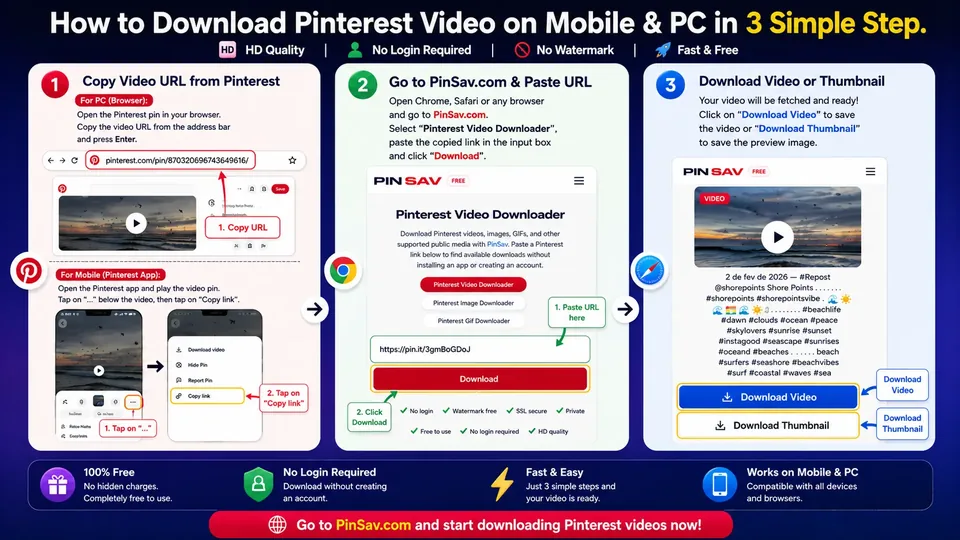
How to Download Pinterest Content with PinSav
With PinSav, saving a Pinterest Pin is simple. All you need is the link to the public Pin you want to save. PinSav supports videos, images, GIFs, reels, and story pins.
Copy the Pinterest link
Open Pinterest and find the video, image, GIF, or other content you want to save. Tap "..." → Copy Link on mobile, or copy the URL from your browser on desktop.
Paste it into PinSav
Paste the Pinterest URL into the download box above and select Download. PinSav checks the public Pin and looks for available media.
Choose your download
If the media is available, select the download option shown and save the file directly to your device.
Video Tutorial: How to Use PinSav Pinterest Video Downloader
What Can You Download with PinSav?
PinSav helps you extract various types of media directly from publicly available Pinterest posts.
Pinterest Videos
Save supported Pinterest videos in the highest quality available from Pinterest servers. PinSav is a free Pinterest Video Downloader that works on any modern browser.
Pinterest Images
Download publicly available Pinterest photos and images in full resolution without taking screenshots. For detailed image-specific guidance, visit our Pinterest Image Downloader.
Pinterest GIFs
Save supported animated GIF content when the original media is available on Pinterest. For dedicated animated content tools, see our Pinterest GIF Downloader.
Idea Pins & Reels
Download supported video and image content from public Pinterest Idea Pins or Reels.
Carousels
Save available images or media from supported Pinterest carousel Pins.
Choose the Format That Works for You
Get your downloaded Pinterest media in standard formats supported by all modern media players and mobile devices.
MP4 Video
Download supported Pinterest videos as standard MP4 files for easy playback on phones, computers, and video editing software.
MP3 Audio
Want only the sound? Convert supported Pinterest videos to MP3 when an audio track is available on the original file.
Original Image
For image pins, PinSav provides the highest available original photo resolution rather than forcing you to crop a screenshot.
Download in the Best Quality Available
Pinterest media can be uploaded in different resolutions and formats, so the final download quality depends on the original media available for that Pin.
When multiple resolution streams (such as HD 1080p, 720p, or 480p) are present in the public media manifest, PinSav lets you select the highest available option.
💡 Honest Quality Guarantee: PinSav doesn't artificially turn a low-quality Pinterest video into a genuine 4K file. The available quality comes directly from the original media Pinterest provides.
Why People Use PinSav
PinSav is built for speed, privacy, and ease of use, eliminating unnecessary steps and registration barriers.
⚡ Fast Processing
Get available download options immediately without navigating through pop-ups or artificial waiting timers.
🔒 Privacy First
No Pinterest password, email, or account login is ever requested or required.
🎥 Quality First
Download the best available media resolution provided for the selected public Pin.
📱 Mobile Friendly
Designed to work comfortably on Android, iPhone, iPad, tablets, and desktop web browsers.
🌍 Works Worldwide
Access PinSav globally from any device where Pinterest public links are accessible.
💧 Watermark-Free Downloads
PinSav does not insert its own branding, logo, or watermark into your downloaded media files.
🆓 Free to Use
Save supported public Pinterest media without hidden fees or download subscriptions.
Simple and Fast: Copy. Paste. Download.
What Can and Can't You Download with PinSav?
To set clear expectations, here is an exact overview of what content PinSav can and cannot retrieve.
| Pinterest Content Type | PinSav Support Status |
|---|---|
| Public Pinterest videos | ✅ Supported |
| Public photos & images | ✅ Supported |
| Animated GIFs | ✅ Supported (if available) |
| Supported Idea Pins | ✅ Supported |
| Supported Pinterest Reels | ✅ Supported |
| Private Pins | ❌ Not Supported |
| Secret boards | ❌ Not Supported |
| Deleted Pins | ❌ Not Supported |
| Login-only restricted content | ❌ Not Supported |
📌 PinSav works strictly with publicly accessible Pinterest content. If Pinterest does not make the media file available through the public Pin link, PinSav cannot retrieve it.
Which Pinterest Links Work with PinSav?
Make sure you are copying the direct link to an individual Pin for the best download results.
✅ Supported Link Formats
PinSav handles standard desktop links, shortened pin.it mobile links, and international domain URLs:
❌ Links That Will Not Work
PinSav cannot process non-Pin pages or restricted URLs:
- Private Pins or Secret board links
- Pinterest user profiles (e.g.
pinterest.com/username) - Pinterest search results pages
- The main Pinterest homepage feed
- Deleted or password-protected content
💡 Pro Tip: For best results, copy the link to the individual Pin itself rather than a user profile or category search page.
Pinterest Download Not Working? Try These Fixes
If your download attempt encounters an error, run through these quick troubleshooting steps:
1. Check the URL
Make sure you have copied the actual Pin link (containing /pin/ or pin.it/) and not a profile or board page URL.
2. Verify Public Visibility
Ensure the Pin is publicly viewable without logging in. PinSav cannot access private or restricted board content.
3. Retry the Link
Temporary network glitches or server load on Pinterest CDN nodes can occasionally affect requests. Refresh and try pasting again.
4. Check if the Pin Exists
If the creator recently deleted or unlisted the Pin, the underlying media stream will no longer be available for download.
5. Try Another Browser
If the download button doesn't respond, try refreshing the page or switching to an updated browser like Chrome, Safari, Edge, or Firefox.
Is PinSav Safe to Use?
PinSav is designed to work in a standard web browser without requiring your Pinterest login credentials or account permissions.
PinSav is designed to work without requiring your Pinterest login credentials. You do not need to provide your Pinterest username, password, or account permissions.
- No login required: Your personal Pinterest credentials remain untouched.
- No app installation: Access PinSav directly through your web browser on mobile or desktop without downloading unknown executable files.
- No mandatory extensions: PinSav runs smoothly as an open web utility without requiring browser extensions.
PinSav does not require you to create an account or provide your Pinterest credentials. Our Privacy Policy explains the technical and third-party data that may be processed when you use the site.
Privacy and Service Data
Here is a clear, factual breakdown of how data is handled when you use PinSav.
URL Processing
When you submit a URL, PinSav fetches public metadata headers from Pinterest CDN servers to locate available media files.
No Credential Access
PinSav never requests, stores, or accesses your Pinterest login credentials or private profile data.
No Permanent File Storage
PinSav does not store, host, or maintain permanent copies of downloaded videos or photos on our web servers.
Download Responsibly and Respect Creators
A public Pinterest Pin isn't automatically free to reuse. Downloading a file and having legal permission to republish it are two very different things.
You should only download or reuse content when you own it, have explicit permission from the copyright holder, or have another lawful basis (such as fair use for personal research or criticism).
Check rights before doing any of the following:
- Reposting Pinterest content on TikTok, Instagram, or YouTube
- Editing or modifying someone else's artwork or video
- Publishing downloaded media on another website or blog
- Using downloaded images or videos for commercial products
- Including downloaded files in paid advertising campaigns
Before downloading or reusing Pinterest content, review the Pinterest Copyright Policy and Pinterest Terms of Service. For information on how PinSav handles data, see our PinSav Privacy Policy.
Pinterest Download Tools
PinSav provides dedicated tools for different types of Pinterest media. Choose the one that matches your content.
Pinterest Video DownloaderCurrent Tool
Save publicly available Pinterest videos in the highest quality provided by the source. Free to use on mobile and desktop.
Pinterest Image Downloader
Download Pinterest photos and images in the best available resolution without taking screenshots.
Pinterest GIF Downloader
Save supported animated GIFs from public Pinterest Pins. Also handles animated content served as MP4 when no GIF file is available.
Frequently Asked Questions
Can I use PinSav on my phone?
Yes. PinSav is designed to work smoothly through modern mobile browsers on Android and iPhone, as well as desktop browsers on Windows, Mac, and Linux.
Does PinSav store downloaded files?
No. PinSav processes public Pinterest media URLs on-the-fly to discover media links provided by Pinterest. We do not host, store, or archive downloaded files on our servers.
Can PinSav download private Pinterest Pins?
No. PinSav is built exclusively for publicly accessible Pinterest content and cannot access private Pins, secret boards, or login-restricted content.
What am I allowed to download and reuse?
You should download content only when you own it, have explicit permission from the creator, or are otherwise legally permitted to save it under applicable copyright laws. Downloading a file does not automatically grant you republication or commercial usage rights.
Are browser extensions required?
No. PinSav works completely inside your web browser without requiring any software installation or extension. Free desktop extensions are also available for Chrome, Firefox, and Microsoft Edge on our Extensions page.
Can I convert Pinterest videos to MP3?
Yes. When a supported Pinterest video contains an audio track, PinSav can extract the audio and allow you to save it as an MP3 file.
Ready to Save a Pinterest Pin?
Copy the link to a public Pinterest Pin and paste it into PinSav.
PinSav — a simple way to save publicly available Pinterest media.