
Pinterest GIF Downloader
Download animated Pinterest GIFs and clips with PinSav. Paste a Pinterest link below to find available GIF downloads without installing an app or creating an account.
How to Download a GIF from Pinterest
Saving a Pinterest GIF with PinSav takes three simple steps without needing technical knowledge or extra apps.
Copy the Pinterest GIF Link
Open Pinterest and find the animated GIF you want to save. Tap Click "..." → Copy Link on mobile, or copy the URL from your browser address bar on desktop.
Paste the Link into PinSav
Open the PinSav Pinterest GIF Downloader, paste the copied URL into the input box, and click Download.
Preview and Save the GIF
PinSav checks the public Pin and displays available animated media. Preview the result and click Download to save the file to your device.
💡 Media Availability Note: The available format and quality depend on the media Pinterest makes publicly accessible for that particular Pin.
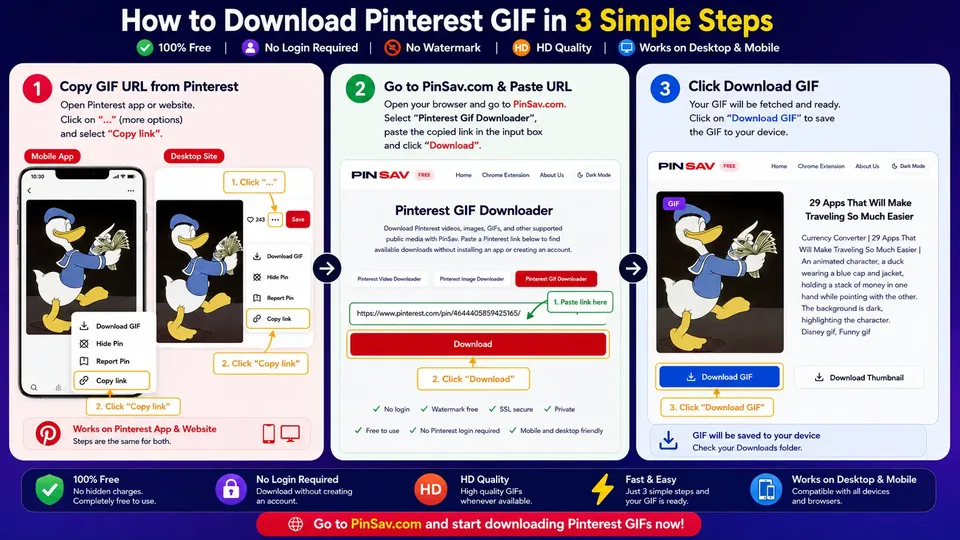
How to Download Pinterest GIFs on Mobile and Desktop
PinSav works through your web browser, so you can use the same seamless process across Android, iPhone, Windows, Mac, and tablets.
🤖 Download Pinterest GIFs on Android
- Open the Pinterest app on your Android device.
- Find the animated GIF you want to save.
- Tap Share and select Copy Link.
- Open Chrome or your preferred browser and visit
https://pinsav.com/pinterest-gif-downloader. - Paste the URL and tap Download to save the file to your Downloads folder.
📱 Download Pinterest GIFs on iPhone (iOS)
- Open Pinterest on your iPhone or iPad.
- Find the GIF Pin you wish to save.
- Tap Click "..." → Copy Link.
- Open Safari and visit
https://pinsav.com/pinterest-gif-downloader. - Paste the link, tap Download, and save the animated GIF directly to your Photos app or Files.
💻 Download Pinterest GIFs on Windows PC
- Open Pinterest in your desktop browser (Chrome, Edge, Firefox).
- Click on the Pin containing the GIF to expand it.
- Copy the URL from the address bar.
- Open PinSav, paste the link into the download box, and click Download.
- Save the animated GIF to your computer Downloads folder.
🍎 Download Pinterest GIFs on Mac
- Open Pinterest in Safari, Chrome, or Brave on macOS.
- Find and open the target GIF Pin.
- Copy the Pin URL from your browser address bar.
- Go to PinSav, paste the link, and click Download.
- Save the animated file directly to your Mac.
Why Do Pinterest GIFs Sometimes Look Like Images?
This is one of the most common points of confusion when downloading GIFs from Pinterest.
A GIF may appear as a still thumbnail image while you are scrolling through your Pinterest feed. That doesn't necessarily mean the underlying Pin is a standard JPEG or PNG photo.
Pinterest often displays a static preview image to conserve mobile data. If you simply take a screenshot or right-click save the thumbnail, you will end up with a static image rather than an animation.
PinSav checks the public Pin for underlying animated media assets and extracts the actual animated GIF whenever available.
Will the Downloaded Pinterest GIF Stay Animated?
When PinSav retrieves an actual animated GIF from a supported public Pin, the downloaded file retains its full animation sequence.
✨ Unlike static screenshots, PinSav saves the actual animated media container so your GIF loops smoothly when shared in chat apps, messaging tools, or saved to your gallery.
Why Use PinSav to Download Pinterest GIFs?
PinSav offers a clean, fast, and user-friendly experience designed specifically for saving Pinterest media.
⚡ Simple 3-Step Process
No complicated configurations or hidden menus. Just Copy → Paste → Download.
🔒 No Pinterest Login Required
Your Pinterest username, password, or account credentials are never requested or needed.
📱 Mobile and Desktop Friendly
Works smoothly on Android, iPhone, iPad, Windows, Mac, and Linux web browsers.
🌐 No Software Installation
Use PinSav directly in your browser without downloading unknown executable applications or APKs.
👁️ Preview Before Saving
Inspect the media preview to make sure you are saving the exact animation you intended.
🆓 100% Free to Use
Save supported public Pinterest GIFs with no hidden subscription fees or mandatory registration.
Which Pinterest Links Should You Use?
For best results, copy the URL of the individual Pin containing the GIF:
✅ Supported Link Formats
Direct Pin link:
Shortened mobile link:
❌ Avoid Pasting These Links
- Pinterest search result feeds
- Main Pinterest homepage feed
- General user profiles (e.g.
pinterest.com/username) - Private board links
Pinterest GIF Downloader Not Working?
If PinSav doesn't return a GIF, run through these diagnostic steps:
1. Check the Pinterest URL
Make sure you copied the link to the individual Pin rather than a general board or search page.
2. Make Sure the Pin Is Public
PinSav cannot access private Pins, secret boards, or login-restricted media.
3. Check if the Pin Still Exists
If the creator deleted the Pin, the underlying GIF media stream is no longer available.
4. Check Media Format
Some Pins look animated on Pinterest but contain video streams instead of standard GIF files. PinSav provides whatever media is publicly available.
Is PinSav Safe to Use?
PinSav provides a browser-native downloading utility designed with security and data privacy in mind.
You never need to provide your Pinterest password, username, account permissions, or extension grants. PinSav resolves public Pinterest URLs in real time and does not store downloaded media on permanent server disks.
Can You Reuse a Pinterest GIF After Downloading It?
Downloading a GIF and having legal permission to republish it are two very different things.
A GIF being publicly visible on Pinterest does not automatically make it copyright-free or public domain. The original creator may be an animator, designer, artist, or brand.
Always check rights before:
- Reposting GIFs on social media channels or blogs
- Using GIFs in paid advertising campaigns
- Including GIFs in commercial projects or client work
Pinterest GIF Downloader FAQ
Frequently asked questions about downloading animated GIFs from Pinterest.
Is PinSav free for downloading Pinterest GIFs?
Yes. PinSav's Pinterest GIF Downloader is completely free to use with no hidden fees or account registration requirements.
Can I download Pinterest GIFs on my phone?
Yes. You can use PinSav through a compatible mobile browser on Android devices and iPhones (Safari, Chrome, Edge) without downloading an app.
Will the downloaded GIF remain animated?
Yes. If PinSav retrieves an actual animated GIF from the supported public Pin, the downloaded file will retain its animated movement.
Do I need to install a browser extension or application?
No. PinSav runs directly inside your web browser and does not require installing any software, APKs, or browser extensions.
Do I need a Pinterest account to download GIFs?
No Pinterest login or account authorization is required. You can save publicly accessible GIFs using just the Pin URL.
Can I download a GIF from a private Pinterest board?
No. PinSav cannot access private Pins, secret boards, or login-restricted Pinterest content.
What quality will my downloaded GIF have?
PinSav provides the highest quality animated media file made available by Pinterest for that specific public Pin.
Why did I download a static image instead of an animated GIF?
Some Pins display an animated preview on Pinterest but contain only a static image file or video stream behind the scenes. Make sure to use the direct individual Pin URL.
Where is my downloaded GIF saved on my device?
Downloaded files automatically save to your browser's default Downloads folder or your device's Gallery/Files app.
Can I use a downloaded Pinterest GIF commercially?
Not automatically. You should verify that you own the rights or have explicit permission from the creator before using downloaded media for commercial or advertising purposes.
Save Your Pinterest GIF with PinSav
Found a GIF you want to keep? Copy the link to the public Pinterest Pin and paste it into PinSav.
PinSav — a simple way to save publicly available Pinterest media.