
Pinterest Image Downloader
Download Pinterest images, photos, infographics, and carousels in original HD quality with PinSav. Paste a Pinterest link below to find available photo downloads without installing an app or creating an account.
Save Pinterest Images Without Taking a Screenshot
PinSav is an online Pinterest Image Downloader that helps you save publicly available Pinterest images directly to your phone, tablet, or computer. Instead of taking a screenshot and losing image clarity, you can download the highest-quality version available for that Pin.
💡 Realistic Quality Note: The available image quality and format depend directly on the original media uploaded to Pinterest. PinSav cannot create a genuinely higher-resolution image when Pinterest does not provide one.
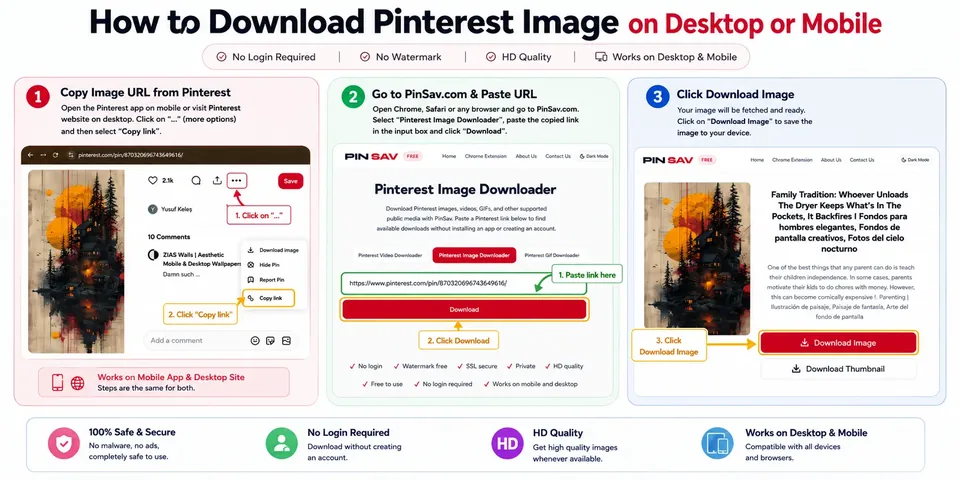
How to Download Pinterest Images with PinSav
Saving a Pinterest photo takes only a few simple steps. You don't need to install an application or browser extension.
📱 Download Pinterest Images on Mobile (iPhone & Android)
- Copy the Pinterest Link: Open the Pinterest app or mobile browser, find your image Pin, and tap Click "..." → Copy Link.
- Paste into PinSav: Open
https://pinsav.com/pinterest-image-downloaderin Safari or Chrome, paste the URL into the download box, and tap Download. - Preview & Save: PinSav displays the available image. Select the download option to save it to your camera roll or downloads folder.
💻 Download Pinterest Images on Desktop (Windows & Mac)
- Copy the Pin URL: Open Pinterest in Chrome, Safari, Edge, or Firefox. Click on the Pin and copy the URL from your browser address bar.
- Paste into PinSav: Go to PinSav, paste the URL into the search box, and click Download.
- Preview & Save: Check the image preview and save the full-resolution file to your computer.
How to Get a Pinterest Image Download Link
PinSav works best when you provide the URL of the individual Pinterest Pin rather than a general category or profile page.
📱 On the Pinterest Mobile App
- Open the specific image Pin.
- Tap the Share icon.
- Select Copy Link.
- Paste the copied URL into PinSav.
💻 On Desktop Web Browsers
- Open the individual image Pin.
- Click the browser address bar.
- Copy the full URL.
- Paste it into PinSav.
URL Examples:
Why Use PinSav to Download Pinterest Images?
PinSav is built specifically for users who need clean, hassle-free photo saving directly from their browser.
High-Quality Image Downloads
Save the highest-quality version made available by Pinterest for the selected public Pin.
Preview Before Downloading
Check the image preview before saving so you don't download the wrong file.
No Screenshot Required
Save the original image file directly without taking low-resolution screenshots.
No Software Installation
PinSav works directly from your web browser with no extensions, APKs, or app downloads needed.
Mobile Friendly
Download photos smoothly on Android, iPhone, iPad, tablets, or desktop computers.
Free to Use
Save supported public Pinterest images without hidden fees or account registrations.
Download Pinterest Images in the Best Available Quality
Pinterest images are stored in different resolutions depending on how the original image was uploaded and served by Pinterest CDN servers.
Why Does Image Resolution Matter?
A higher-resolution photo remains sharp and detailed when viewed on larger displays, tablets, or design monitors. Taking a low-resolution screenshot may look acceptable on a phone, but it will blur when zoomed in.
PinSav prioritizes extracting the original, full-size image file provided by Pinterest rather than simply capturing what is visible on screen.
What Pinterest Images Can You Download?
PinSav supports various public image types and formats served on Pinterest:
📷 Standard Photos
Download photography, design artwork, and fashion images in full resolution.
📊 Infographics
Save tall vertical infographic graphics without cropping or compression blur.
🎞️ Animated GIFs
Save supported animated GIF content when the original file is available.
📚 Carousel Images
Download available image slides from supported multi-photo carousel Pins.
🖼️ Image Formats
Extract JPG, PNG, and WebP file formats as provided by the original source.
Can You Download Images from Pinterest Boards and Idea Pins?
Here is how PinSav handles public Idea Pins and individual board images.
For Idea Pins, PinSav can retrieve publicly accessible image content when submitted via a supported Pin link.
For Pinterest Boards, copy the link to the specific image Pin inside the board for best results.
Which Pinterest Links Can I Use?
Always submit an individual Pin URL for seamless extraction.
✅ Supported Link Formats
❌ Links That Will Not Work
- Pinterest profile pages
- Search results feeds
- Private board links
- Deleted or unlisted Pins
Pinterest Image Downloader Not Working?
If you encounter an issue downloading an image, try these quick fixes:
The image doesn't appear
Check that you copied the actual link to the individual Pin (containing /pin/ or pin.it/).
The download button isn't available
The target Pin may be private, restricted, or deleted from Pinterest servers.
The image quality isn't what you expected
The available resolution depends on the original file. PinSav cannot recover a higher-resolution version if Pinterest does not serve one.
The link is from a board
Open the specific image Pin within the board and copy its individual URL.
Download Pinterest Images on Any Device
PinSav runs entirely through modern web browsers. You can use it from Android, iPhone, iPad, Windows, Mac, and Linux without downloading separate software.
Is PinSav Safe to Use?
PinSav provides a secure browser utility with no account login requirements.
- No Pinterest password required: Your login credentials are never requested.
- No account connection: You do not need to link your Pinterest profile.
- Browser-native: Runs safely inside your browser without installing APKs or desktop executables.
Does PinSav Store Downloaded Images?
No. PinSav processes public Pinterest media URLs on-the-fly to resolve media links. We do not host, store, or maintain permanent copies of downloaded photos on server disks.
Downloading Pinterest Images Responsibly
Pinterest is a visual discovery platform, but the person who pinned an image isn't necessarily the creator who owns it.
Saving an image for personal reference or moodboard inspiration is different from republishing, selling, or using it commercially.
Always check rights before:
- Reposting images on social media or personal blogs
- Using images in paid marketing or promotional campaigns
- Using artwork or photography for commercial products
Pinterest Image Downloader FAQ
Frequently asked questions about downloading Pinterest images, resolutions, and supported formats.
How do I download an image from Pinterest?
Copy the link to the individual Pinterest Pin, paste it into the PinSav downloader box on this page, and click Download. PinSav will locate the available image file for you to save.
Can I download Pinterest images on my phone?
Yes. PinSav works through modern mobile web browsers on Android and iPhone (iOS Safari, Chrome, Edge) without requiring an app download.
Can I download Pinterest images without the Pinterest app?
Yes. You can use PinSav directly in your web browser without installing the Pinterest application or any browser extensions.
Can I download Pinterest images in HD or 4K?
PinSav provides the highest resolution image version made available by Pinterest for that specific public Pin.
Can I download images from multi-photo Carousel Pins?
Yes. When you submit a public Carousel Pin URL, PinSav identifies available image slides so you can save them to your device.
What image file formats does PinSav support?
PinSav supports standard image formats provided by Pinterest, including JPG, PNG, WebP, and animated GIF files.
Why is my Pinterest image download not working?
Common causes include pasting an incorrect page URL (like a profile instead of a Pin), trying to download a private or deleted Pin, or temporary network issues.
Does PinSav store downloaded images on its servers?
No. PinSav resolves public Pinterest image file links in real time and does not store or archive downloaded files on server disks.
Can I use downloaded Pinterest images commercially?
Not automatically. Saving an image for personal reference is different from reusing it commercially. You must obtain permission from the copyright owner for commercial use.
Is PinSav free to use for downloading photos?
Yes. PinSav is 100% free to use with no account registration or hidden subscription fees.
Ready to Download Pinterest Images?
Copy the link to a public Pinterest image Pin and paste it into PinSav.
PinSav — a simple way to save publicly available Pinterest media.